




Setting how compact the interface on Trisquel 12 (MATE)

First of all: happy GNU year!
I am temporarily back to France for the new-year celebration with my parents. My siblings and I offered them a laptop (https://www.asus.com/laptops/for-home/vivobook/asus-vivobook-15-x1504/ but without Windows) to replace their 13-year-old computer, which was however still running Trisquel 11 well. I installed https://cdbuilds.trisquel.info/ecne/trisquel_12.0_amd64.iso (the MATE edition of Trisquel 12) on the new laptop. With a Wi-Fi dongle, everything is essentially OK (Bluetooth does not work, but it does not matter) except for a few issues.
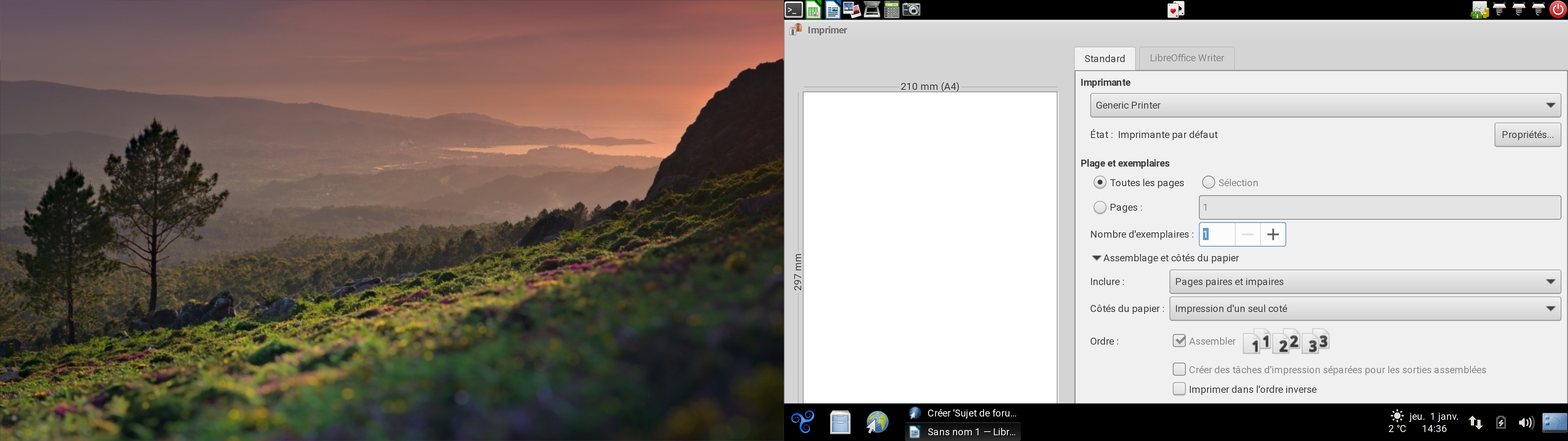
The main one I am struggling with is a bad setting I chose at some point. I am not sure if it is during the installation or, more probably, after the first reboot. I chose how compact the interface is, or something like that. As far as I remember, there were three options, maybe compact, normal and spacey, and I selected the latter. Unfortunately, given the resolution of the two screens (1920x1080) and the vision of my parents (my father will be 70 this year), I have to set the 200% scaling factor (100% is not enough) in the monitor preferences and, together with the bad setting, some windows end up going over the edges of the screen, both vertically and (mainly) horizontally. See the attached screenshot for an example (the print window of LibreOffice Writer) where neither the button to minimize/maximize/close the window nor the bottom of the window appear (it is impossible to click the Cancel button or the Print button if you do not know that you can drag a window With Alt+Click).
Anybody here who installed Trisquel 12 (I do not remember such a setting in previous versions) knows what setting I am talking about? How to access it from the installed system (or edit a configuration file to do so)? Thank you in advance for the help!
| Attachment | Size |
|---|---|
| print_window_going_out_of_screen.png | 1.75 MB |

 I am a translator!
> I am not sure if it is during the installation or, more probably, after the first reboot. I chose how compact the interface is, or something like that. As far as I remember, there were three options, maybe compact, normal and spacey, and I selected the latter.
Are you sure it was an option from MATE, and not from some app? I really cannot remember any such option in MATE, even in Ecne. I may not have used the same ISO (I sometimes took an ISO from https://devel.switnet.org/test-isos/, but not the last one which is very recent) but I would not expect MATE to be that different in those different ISOs. Nevertheless, I'll try to install Ecne again on my T400 to check, if possible tomorrow afternoon.
> I have to set the 200% scaling factor (100% is not enough) in the monitor preferences
On some laptops, in the Hardware->Display settings, in order to increase the size but to less than 200%, I selected 100% but with a lower screen resolution with the same aspect ratio (like 1600x900 or 1440x810) and the display was good. Besides, I almost never keep the default font size which is really too small for me. On the 14 inch screen laptop I am using now (1920x1080 resolution too), I have 14 for all fonts in appearance->appearance->fonts, but sometimes I feel like even choosing 15 or 16. So far, all apps I used did properly adjust their fonts to the size from the general MATE settings.
> See the attached screenshot for an example (the print window of LibreOffice Writer) where neither the button to minimize/maximize/close the window nor the bottom of the window
I tried 200% on my T400, it is exactly the same.
Are you sure it was an option from MATE, and not from some app?
I am not sure of anything anymore. Maybe I fussed a little on the live desktop before installing and found it there, but, then, shouldn't the setting be on the installed system too? I will reboot on the live system to see if I find the setting there, for some reason.
I sometimes took an ISO from https://devel.switnet.org/test-isos/
I used https://cdbuilds.trisquel.info/ecne/trisquel_12.0_amd64.iso (from October 29th). I believe I had better use the most recent ISO in the directory you gave.
I'll try to install Ecne again on my T400 to check, if possible tomorrow afternoon.
That is very nice of you!
On some laptops, in the Hardware->Display settings, in order to increase the size but to less than 200%, I selected 100% but with a lower screen resolution with the same aspect ratio (like 1600x900 or 1440x810) and the display was good.
It is kind of sad to not be able to use the full resolution of the screens.
I will reboot on the live system to see if I find the setting there, for some reason.
I have not found anything. I guess the dialog to set how compact the interface must have appeared after the first startup. I even remember that the space between the icons on the desktop was changing as I was trying the different options (but I believe the dialog window was changing too). Has nobody here seen that dialog while/after installing Trisquel 12? Am I losing my mind? Going banana all the way?
I am a translator!
I even remember that the space between the icons on the desktop was changing as I was trying the different options (but I believe the dialog window was changing too).
Changing the desktop font size does not change the space between icons on the desktop, then the icon labels may ovelapp when choosing large fonts. What you describe here looks like a setting in caja, which has "Niveau de zoom par défaut" set to 100% by default, and changing it will change the desktop icon size. There is also a checkbox "Utiliser l'agencement compact". However, these settings only affect the Caja windows and the desktop (because it is managed by Caja), nothing else.
I am a translator!
I just installed Ecne on the 2nd disk of my T400, using the ISO from https://devel.switnet.org/test-isos/. At boot, the box to type the LUKS passphrase and the background only occupy a subset of the screen (something around 30%) but after entering it, everything is normal and there are no updates to apply at all.
I cannot find any option like you described. I have a vague recollection of an app offering a choice like you mentioned, perhaps icedove that I tried once or twice but not sure (I use evolution).
I am farsighted (I need +3/+3.5 for long distance vision) and slightly astigmatic, I have been wearing glasses since I was 4, progressive glasses for more than 10 years now (+1.5 more), and the default Trisquel fonts are highly uncomfortable for me, even with the 1440x900 resolution of my T400 (14 inch). With all fonts set to 14 (except for desktop icons where I use 12 to avoid icon text to overlap with the next icon) instead of 10 or 9 by default, it looks perfectly fine for me in LibreOffice: only the "Format" menu does not entirely fit (but I can access all items), the print window of LibreOffice fits in the screen.
So my suggestion would be to try with 100% but large enough fonts, I hope you can find a solution that way. With nabia, some QT apps did not scale and I had to do something as mentioned in https://trisquel.info/fr/forum/font-size-not-controlled-mate-settings#comment-162200, but I did not have anything to do on Ecne like this.
Thank you very much for your help. I went ahead with your approach. I have reset the scaling factor to 100%, doubled the height of the panels (to 69 pixels for the default one), doubled every font size in the the "Font" tab of "Appearance", increased the size of the pointer in the eponymous tab of the window that appears when you "Customize..." the theme (a button in "Theme"), chose the Greybird window borders (for larger and more spaced minimize/maximize/closed buttons) in the same place, set LibreOffice Calc's zoom to 200%, that of Caja too (and, in the display tab of its "Preferences", removed the additional labeling appearing at that level) and, finally, I changed the zoom of Abrowser for the websites my parents use the most. Keeping the 1920x1080 resolution, it looks OK. I will let them use the computer for a week and see if they are pleased.
Anyway, if anybody here have seen the dialog window I was writing about, I still would be happy to know that I am not losing my mind!
I am a translator!
if anybody here have seen the dialog window I was writing about
As mentioned in my other message, it may in be the caja settings, view tab, icon view tab. It affects the arrangement and size of desktop icons and folder/file icons in caja windows.
the Greybird window borders (for larger and more spaced minimize/maximize/closed buttons)
For some reason, that setting does not survive a reboot.
I have reset the scaling factor to 100%, doubled every font size in the the "Font" tab of "Appearance", increased the size of the pointer in the eponymous tab of the window that appears when you "Customize..." the theme (a button in "Theme"), chose the Greybird window borders (for larger and more spaced minimize/maximize/closed buttons) in the same place, increased the height of the panels (to 69 pixels for the default one), set LibreOffice Calc's zoom to 200%, that of Caja too (and, in the display tab of its "Preferences", removed the additional labeling appearing at that level) and, finally, I changed the zoom of Abrowser for the websites my parents use the most.
One more change my parents asked for: in LibreOffice, I set the "Icon Size" of the "Toolbar" to "Extra Large". That setting, categorized in "LibreOffice -> View" can be accessed through the menu Tools/Options...

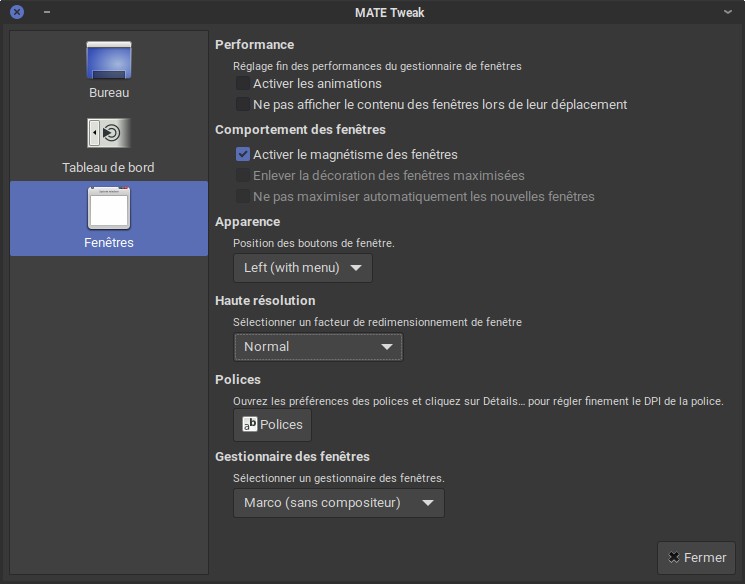
We believe we may have found your lost window:
I am a translator!
Does anything here allow more scaling options? In "Haute résolution", the only options I have are "Détection automatique", "Normal" and "Haute résolution". Normal and automatic detection are the same, "Haute résolution" is the same as setting 200%.
On my T400, when I tried that, everything was immediately offscreen, I could not find another to regain control than switching to a virtual consol to close the mate session with a command.
Exactly. I was talking about another dialog window.
Did you try Alt+Tab to select the MATE Tweak window, then Alt+F7 to move it around? Shift+LeftArrow should then send it to the left. Except, of course, if you have configured your keyboard shortcuts different.
On an old 22" 1680x1050 monitor the "Haute résolution" option messes around with panel elements and sends the window list out of view, since I tend to stack everything on a single panel, but all open windows remain in sight, albeit partially only. So on a recent 1920x1080 display I assumed it may only marginally bring windows out of sight. Marginally, but annoyingly enough to get a magical banana bananas. But it appears that the banana has been ingesting magical plants and is now hallucinating windows.
Did you try Alt+Tab to select the MATE Tweak window, then Alt+F7 to move it around?
I did not know of Alt+F7. I knew of Alt+clic though. It does the same.
Marginally, but annoyingly enough to get a magical banana bananas.
It was annoying. I went back to the 100% zoom factor and increased the fonts/panels/icons/pointer/... as I explained in https://trisquel.info/forum/setting-how-compact-interface-trisquel-12-mate#comment-181944 with more details.
But it appears that the banana has been ingesting magical plants and is now hallucinating windows.
It appears so. Sure, I was at my sister's drinking a glass of Pastis when I was installing the system on the soon-to-be-offered laptop, but is that now enough for me to hallucinate windows?
> I knew of Alt+clic though. It does the same.
How can you click on an out-of-bounds window? I think you have hallucinated that too.

Hello,
do you know who the ?>? sell those pc in Europe?
Just asking.
Happy Hacking.
https://www.cdiscount.com/informatique/ordinateurs-pc-portables/pc-portable-asus-vivobook-15-x1504-sans-windows/f-1070992-x1504vabq2997.html was the URL... but it is now redirected to the laptop category on the site.
EDIT: https://www.cdiscount.com/informatique/ordinateurs-pc-portables/pc-portable-asus-vivobook-15-x1504-sans-windows/f-10709-x1504vabq3964.html seems to be the new URL. For the same 420€, there were only 8 GB when we bought it (against 16 GB now). I added 4 GB of RAM though. By the way, the laptop is significantly easier to open that any other laptop I got in the past decade.
As I wrote, everything but the Wi-Fi and the Bluetooth works. Well, I did not even try to make them work. The bad news for all of us is that the Intel integrated graphics apparently depend more and more on a binary firmware. Outside 3D video games, everything (using the highest resolution, playing video, etc.) is good enough, but I tried SuperTuxKart with and without the firmware (I removed in the end, of course) and the difference in FPS is very visible. I did not measure it though.

Scaling greater than 100% is only useful with 2.5K, 4K, 5K, 6K, and 8K monitors.
For 720p and 1080p resolutions the best thing to do is increase the font size.